
Introduction to Querri
Querri is an AI-powered data analysis platform that lets you explore, analyze, and visualize your data using natural language conversations. Instead of writing complex queries or formulas, simply ask questions and let Querri’s intelligent agent do the heavy lifting.
What is Querri?
Section titled “What is Querri?”Querri combines the power of artificial intelligence with intuitive chat-based interactions to make data analysis accessible to everyone. Whether you’re a business analyst, executive, or data professional, Querri helps you uncover insights faster and share them more effectively.
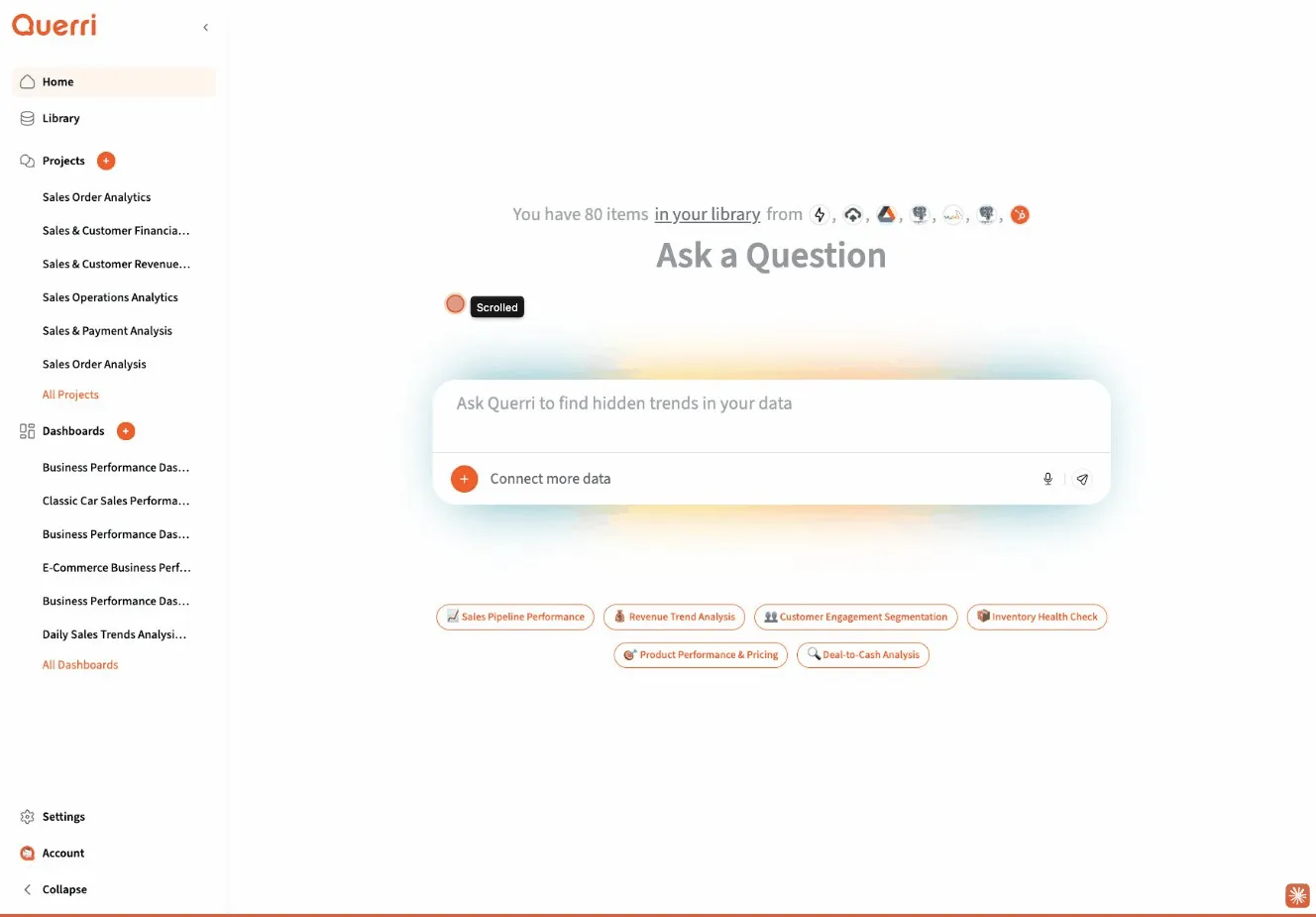
At its core, Querri features:
- Conversational Interface: Ask questions in plain English and get immediate answers
- Automated Analysis: An AI agent that creates data workflows for you automatically
- Smart Visualizations: Charts, tables, and dashboards generated from your data
- Collaborative Sharing: Share insights with teams or publicly via secure links
- Enterprise Security: Fine-grained permissions and access controls
Key Features
Section titled “Key Features”Chat-Based Data Analysis
Section titled “Chat-Based Data Analysis”The heart of Querri is its chat interface. Simply describe what you want to know, and Querri’s AI agent will:
- Understand your question in natural language
- Create the necessary data operations (called “steps”)
- Execute analysis on your data
- Present results in tables, charts, or custom visualizations
- Respond to follow-up questions to refine your analysis
Automated Workflows
Section titled “Automated Workflows”When you ask a question, Querri automatically builds a series of steps to answer it. These steps might include:
- Loading data from your connected sources
- Filtering, aggregating, or transforming data
- Creating visualizations
- Running calculations or statistical analysis
You don’t need to know SQL, Python, or any programming languages—Querri handles the technical details.
Dashboards & Visualizations
Section titled “Dashboards & Visualizations”Turn your analyses into shareable dashboards with Querri Pro. Create custom visualizations that update automatically and share them with stakeholders who need to stay informed.
Data Connectors
Section titled “Data Connectors”Connect to your existing data sources:
- Upload CSV or Excel files
- Connect to databases
- Integrate with cloud storage
- Link to business applications
Smart Sharing
Section titled “Smart Sharing”Share your insights with anyone:
- Share Links: Generate public or private links to specific analyses
- Collaboration: Work together with team members on projects
- Permissions: Control who can view, edit, or manage your projects
Enterprise-Grade Security
Section titled “Enterprise-Grade Security”Querri includes fine-grained access controls powered by authorization frameworks, ensuring that sensitive data remains protected and only accessible to authorized users.
Who Is Querri For?
Section titled “Who Is Querri For?”Business Users
Section titled “Business Users”Explore data and answer business questions without waiting for technical teams. Get insights in minutes, not days.
Data Analysts
Section titled “Data Analysts”Speed up your workflow by automating routine analysis tasks. Focus on interpretation and strategy rather than data wrangling.
IT & Admin Teams
Section titled “IT & Admin Teams”Deploy a secure, scalable platform that empowers your organization while maintaining control over data access and governance.
Executives & Decision Makers
Section titled “Executives & Decision Makers”Access real-time insights through dashboards and reports. Make data-driven decisions with confidence.
Common Use Cases
Section titled “Common Use Cases”Business Intelligence
Section titled “Business Intelligence”- Monitor KPIs and business metrics
- Track performance across teams or departments
- Identify trends and patterns in historical data
Data Exploration
Section titled “Data Exploration”- Discover insights in new datasets
- Ask exploratory questions without predefined queries
- Quickly prototype analyses before building formal reports
Reporting & Communication
Section titled “Reporting & Communication”- Generate automated reports from live data
- Share findings with stakeholders via dashboards
- Create presentations backed by real-time data
Ad-Hoc Analysis
Section titled “Ad-Hoc Analysis”- Answer one-off business questions quickly
- Investigate anomalies or unexpected results
- Test hypotheses without writing code
How It Works
Section titled “How It Works”Querri uses an intelligent Planner Agent that orchestrates your entire analysis:
- Ask a Question: Type your question in natural language in the chat interface
- Agent Sets a Goal: Translates your request into a specific analytical objective
- Finds Relevant Data: Searches your Library and loads 1-3 most relevant sources
- Investigates: Examines data structure using SQL queries (DuckDB)
- Creates a Plan: Designs a sequence of steps to achieve your goal
- Executes Steps: Runs transformations, creates visualizations, performs analysis
- Presents Results: Shows QDF tables, Plotly charts, and insights
- Refines Through Conversation: Maintains context for follow-up questions
- Delivers: Completes all goal deliverables (charts, analyses, exports)
The agent can work across up to 30 turns in a single conversation, remembering previous steps and building incrementally toward your goal.
What Makes Querri Different
Section titled “What Makes Querri Different”- Selective Data Loading: Typically loads 1-3 sources at a time to keep analysis focused
- Multi-Turn Conversations: Builds complex analyses through natural back-and-forth
- Goal-Oriented: Tracks what you asked for and ensures deliverables are completed
- Data-Grounded: Never estimates or guesses—all insights based on actual data analysis
- Transparent Workflow: Every step is visible so you can understand and trust results
Getting Started
Section titled “Getting Started”Ready to start analyzing your data with Querri? Head to our Quick Start Guide to begin your first analysis in minutes.
If you’re an IT administrator setting up Querri for your organization, contact your Querri representative for deployment assistance.