
One number, one definition
When two people bring different numbers for the same thing, find the choice they made differently, settle it once as a KPI, and write the rule down so later answers match.
Before you start
Section titled “Before you start”- Permissions: anyone who’s signed in can use Librarian chat, and anyone who can see a KPI can open its panel. There’s no button to create a KPI, and you change how one is calculated by asking the Librarian.
- Data you need: the table the number should come from. The example uses the Average Deal Size KPI from the Curio Library in these docs. See Explore the sample company.
- Credits this uses: each message to the Librarian uses a credit. Reading a KPI’s panel, Recompute and attaching a fact don’t.
Say sales and finance each bring an average deal size to Monday’s meeting, and the numbers don’t match. Nobody made a mistake. Sales divided by every deal in the pipeline, and finance divided by the deals that closed.
1. Find the choice that differs
Section titled “1. Find the choice that differs”Different numbers for the same thing almost always mean different definitions, not bad math. Ask each person how they got theirs, and look for the choice that differs:
| Choice | For example |
|---|---|
| What’s counted | Every deal, or only won deals. Gross revenue, or net of returns |
| Which date | The order date, or the date it shipped or closed |
| Which period | Last month, or the last 30 days |
| Which table | The store’s own system, or the finance system |
If the numbers came from Querri, open each answer’s route row and Show the query. The route row names the table, and the query shows the filters and dates. See Check an answer before you share it.
2. Agree on one definition
Section titled “2. Agree on one definition”Settle it with whoever owns the number, and write it as one sentence: what’s counted, which date it goes by, the period, and the table it comes from. In the Curio Library these docs use, it reads: “Average deal size per month, calculated as total won amount divided by the number of distinct won opportunities, grouped by the month the deal closed.” It’s measured from the view Pipeline by stage.
So which of the first two numbers was right? Neither. They answered different questions, and now your team has picked one.
3. Make it a KPI
Section titled “3. Make it a KPI”In the Library’s words, KPIs are “the numbers your business tracks, defined once so everyone calculates them the same way.” Each one is measured from one table with one query, so the definition lives in one place.
Open Library, then the Metrics tab, and look for the number.
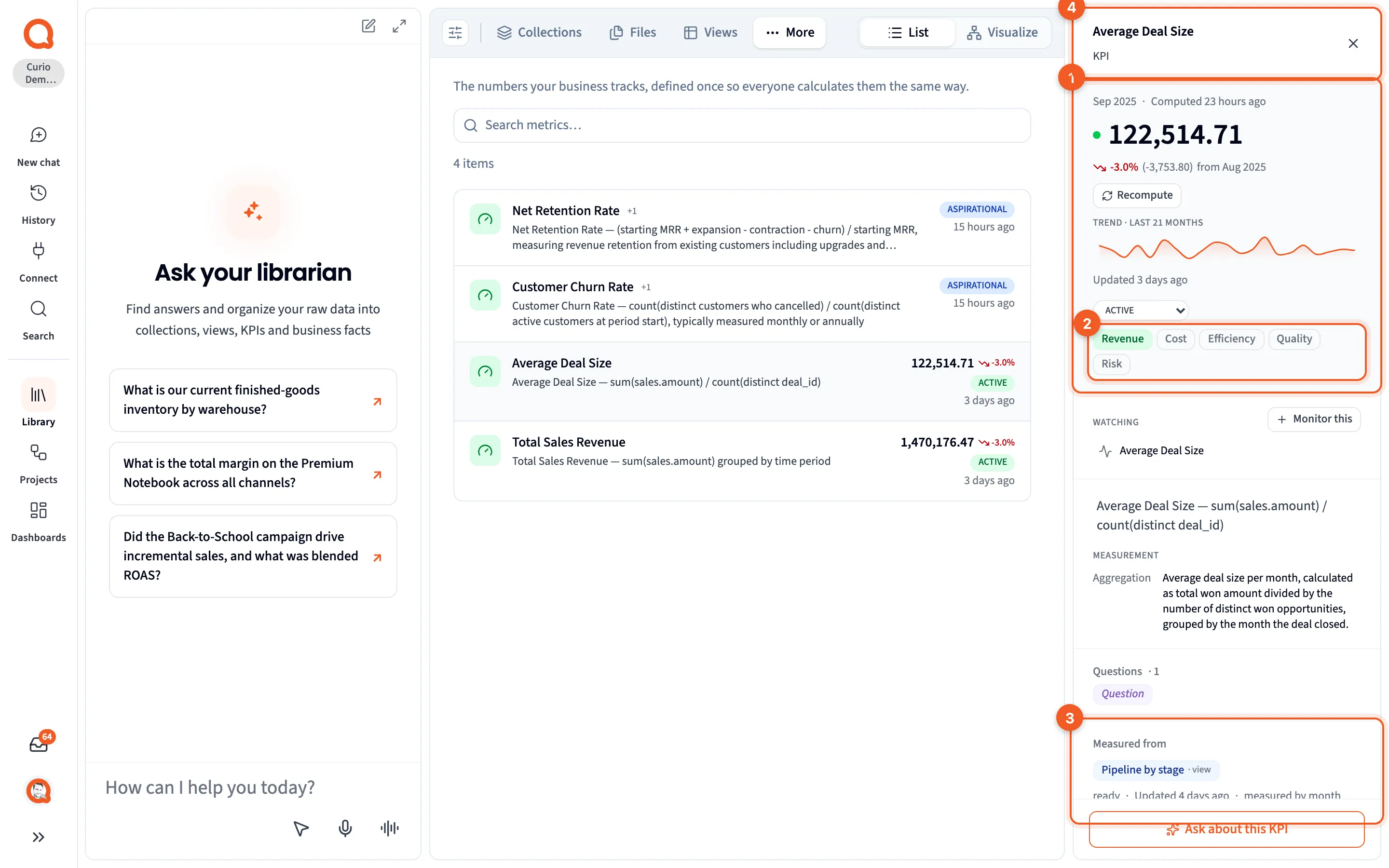
- The value: the latest value and the period it covers.
- Dimensions: which of the five dimensions of business value it counts toward.
- Measured from: the one table the value comes from.
- The header: the KPI’s name.
If the KPI exists, compare it with your sentence. Its definition and Measurement, with the Window, Aggregation and Filter, sit below the value. In that Library, Average Deal Size already matches the sentence above, so there’s nothing to change.
If yours doesn’t match, ask the Librarian to change it, and say exactly what it should count:
Change Average Deal Size to count only won opportunities, each one once, by the month the deal closed.
You can’t edit the calculation on the panel. Measurement SQL sends you to chat instead: “Ask the librarian to change how this metric is measured.”
If there’s no KPI yet, ask for one, with the whole definition:
Track net revenue as a KPI: paid orders minus returns, by the month the order was placed.
A Metric to track card in your Inbox is another way in, and accepting it adds the KPI. Read its definition first. One the Librarian picked may not match how your business counts.
4. Write the rule down as a fact
Section titled “4. Write the rule down as a fact”The KPI settles this one number. A fact carries the rule to other questions about the same data, because when Querri writes a query against a table, it takes the facts attached to that table into account.
Ask the Librarian to record it, for example “Remember that deal size counts won opportunities only.” Or add it yourself with Attach a fact on the panel of the column the rule is about. Either way, it shows under Facts attached. Write down definitions and rules covers what else is worth recording, and where each rule goes.
An answer doesn’t show which facts went into it, so when a number matters, check the answer anyway.
5. Retire the other version
Section titled “5. Retire the other version”If you find a second KPI that measures the same thing another way, open its panel and set its state to DEPRECATED. The change saves straight away, and anyone browsing Metrics can see which one to use.
6. Ask for the number by name
Section titled “6. Ask for the number by name”When the Librarian answers with a KPI, it quotes the value the KPI has already calculated instead of working the number out again. So name the KPI and the period when you ask, like “What was Average Deal Size in August 2025?” A question worded another way, or cut another way, can be answered from a view or your tables instead, and then it may not match.
Check your work
Section titled “Check your work”- The KPI’s definition and Measurement match your sentence.
- Measured from names the table you agreed on.
- Asking about the KPI by name gives the value the panel shows.
- The rule shows under Facts attached.
- Any other version of the KPI reads DEPRECATED.
Troubleshooting
Section titled “Troubleshooting”The panel says Not yet computable. No query has been written and no table is bound. Ask the Librarian to measure the KPI from the table that holds the data, as the panel suggests.
The value didn’t change after the Librarian updated the KPI. A note says the query changed after the last value was calculated. Click Recompute.
The value is hidden. Your access covers only some of the rows in the table, and the value is calculated across all of them.
Chat gave a different number from the KPI. The answer probably didn’t use the KPI, or it covered a different period. Open its route row, if it has one, to see what it read. Then ask again with the KPI’s name and the period.
Next steps
Section titled “Next steps”- Check an answer before you share it: see what an answer read before you trust the number.
- KPIs: the parts of a KPI and the five dimensions.
- KPI panel: everything the panel shows.
- Facts & Rules: how rules get recorded, and what they apply to.