
Start with questions, not tables
Most data tools open with a list of tables and ask what you want to know. For most people that’s backwards. Querri starts from the questions your business keeps asking, and organizes the rest of your data around them.
The idea
Section titled “The idea”Hand someone a folder of tables and ask “what do you want to know?” and they’ll usually stall. They know the business fine. What they don’t know is which table holds the answer, or what a blank in some column is supposed to mean.
A question fills in what’s missing.
Take a blank delivery date. Does it matter? If you’re counting orders, hardly. If you’re measuring on-time delivery, it decides whether a shipment counts at all. You can’t clean data well until you know what it’s for, and the question is what tells you.
So the business question sits at the center of the Library. The Questions tab says it in one line: each question “anchors a collection and tells the Librarian what to build.” Everything else hangs off your questions. A collection gathers one business concern around a main question. Each view is a saved, pre-calculated table built to answer a question directly. KPIs are the numbers your questions keep coming back to, defined once. And facts record the rules an answer depends on, like what counts as a sale.
None of this has to exist before you start. Connect a system or upload a file and ask a question, and Querri works from your source tables when there’s no view to use. The structure builds up as you go: ask the Librarian to add a question, build a view or define a KPI, and decide on the suggestions it leaves in your Inbox. You can spend an afternoon writing your questions down first, or start asking and let the Library fill in. Both work. See The Librarian and How the Library learns.
Onboarding asks for your questions before it asks for your data. It opens with “What keeps you up at night?”, takes two more topics, and the Librarian suggests questions for you to pick from. Before any data is connected, that gives you a collection with an anchor question and refining questions, plus up to three KPIs marked aspirational. It doesn’t create views or facts. Your first 30 minutes walks through it.
An example
Section titled “An example”Curio, the sample company, makes paper products and sells them wholesale, in its own stores and online. Its Revenue & Sales collection is built around this question:
What is our revenue by channel (eCommerce, retail, B2B)?
Narrower questions sit under it, such as “What is the total revenue per customer?” and “What are our biggest revenue leaks: churn, downgrades, and credits?” On the collection page, each question shows where it stands.
| Status | What it means | In Curio |
|---|---|---|
| Answered | A view answers the question. | ”What is the total revenue per customer?” is answered by the view Revenue by customer. |
| Answerable | The data can support an answer, but no view exists yet. | The revenue leaks question, with + Build a view to answer this under it. |
| No view yet | Neither of the above. | The main question itself. |
No view yet is the one people misread. It doesn’t mean Curio’s data can’t answer the channel question. It means nobody has built a view for it yet, which makes it the obvious next thing to work on.
Where it lives in Querri
Section titled “Where it lives in Querri”Your questions are listed on the Questions tab in the Library. Each collection page lists its own questions with the statuses above.
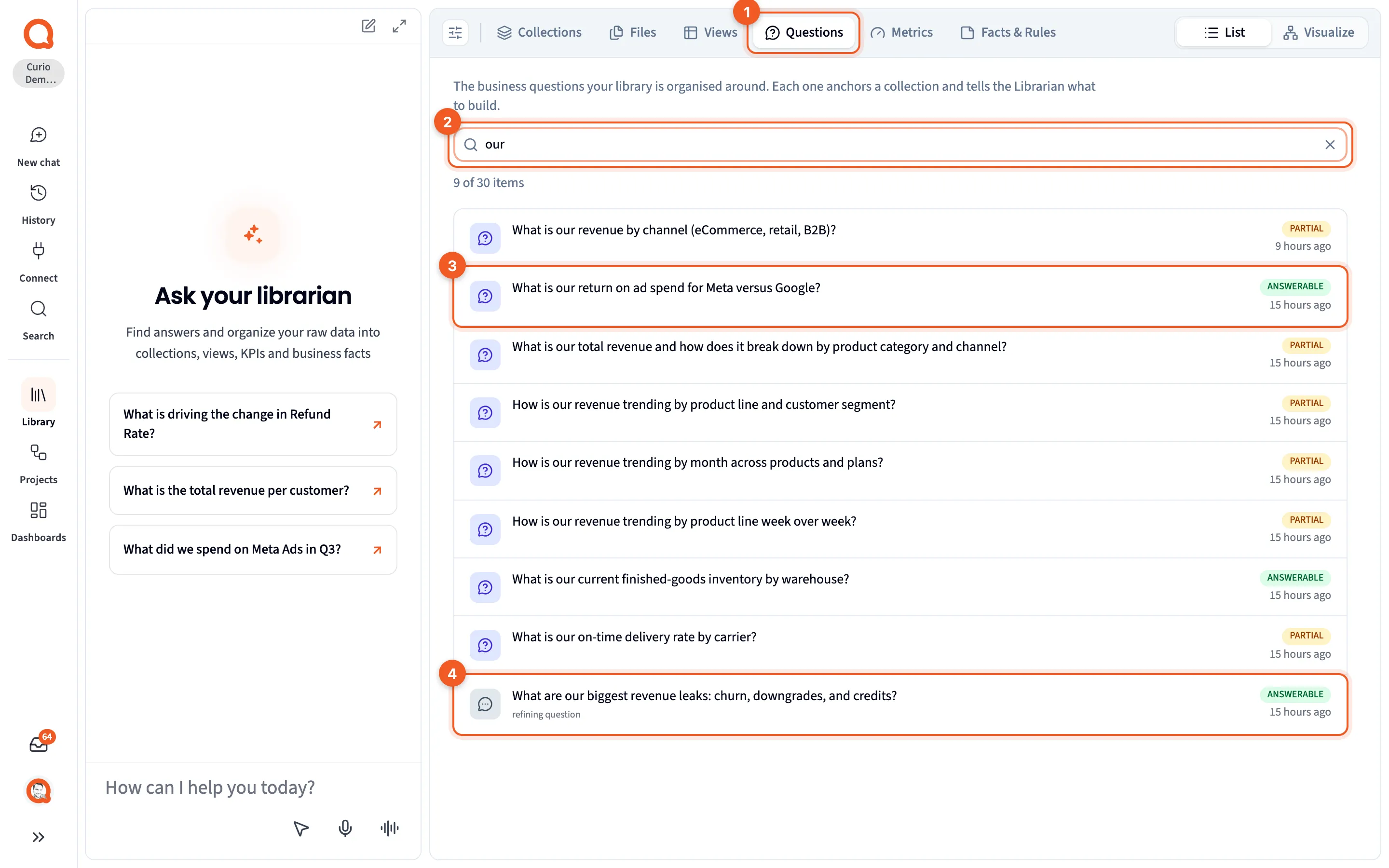
- Questions: the tab.
- The search box, filtering the list to “our”.
- An anchor question: the main question of a collection.
- A refining question: a narrower question under an anchor, marked “refining question”.
The badges on this tab, such as ANSWERABLE and PARTIAL, check something different from the collection page. They say whether your data reaches the question at all, whether or not a view exists. Knowledge tabs explains both sets, and Detail panels covers the collection page.
Next steps
Section titled “Next steps”- Anchor and refining questions shows how a broad question breaks down.
- Collections covers what a collection holds.
- Build your Library around questions puts this into practice.