
How Querri answers a question
Before you put a number in front of your boss or a client, you want to know where it came from. AI that answers questions about data has a strong tendency to be confidently wrong, so every Library answer in Querri comes with what you need to check it: what it read, the rows it got back and the query behind them.
Read the transcript
Why an answer needs a trail
When you ask Querri a question about your data, it shows you where the answer came from… so you can check it before you share it. A number is only as useful as your confidence in it. If you can’t see where it came from, you can’t really stand behind it.
Where Querri looks first
So Querri starts with what your team has already built. It first looks for a saved view that answers your question, or a KPI with a view behind it. It uses a view only when it fits the question you asked. If nothing fits, or the view comes back empty, it works straight from your source data. And if that result is worth keeping, it can offer to save it as a new view… or you can just ask it to.
Check the answer
Either way, when it reads your data, the answer shows the rows it returned, the exact calculation behind them, and which views and sources it read.
Follow the route
On your Library’s map, the parts it looked at light up, so you can follow the route from the answer back to your data. Ask the questions that matter most to your business… and see exactly where the answers come from.
The idea
Section titled “The idea”The Librarian works down a short list of places an answer could come from.
First, something your team already built
Section titled “First, something your team already built”It looks for a saved view that answers the question and has a query it can run. A KPI can answer too, through the view it’s measured from. When the question is about a KPI’s number, the Librarian quotes the value the KPI has already computed instead of working it out again.
This is the path you want most of the time. The view’s joins and cleaning were done once, so the answer comes back quickly and matches what everyone else got last week. Accurate and fast are two sides of the same coin, and reusing a view is where the two meet.
Only if it fits
Section titled “Only if it fits”A view is used only when it clearly owns your question. It can’t be narrower than what you asked, like a one-channel view for an all-channel question, or wider. When it isn’t clear which view fits, the Librarian makes the call. If the view it picks comes back empty, it goes to your source data instead.
Everything else is answered straight from the tables your sources provide.
When nothing fits
Section titled “When nothing fits”If nothing in your Library relates to the question, the Librarian declines. The answer reads Query declined, with no number to mistake for a real one.
It may build a table for the question instead: when you ask for one, when its first answer measured the wrong thing, or when it found related data that didn’t answer. The table comes marked unsaved, with a card offering Save this table as a view. Saving is your decision. If the build fails, the answer says so.
Checking an answer
Section titled “Checking an answer”So how do you check one? Every answer block starts with a route row, one line saying where the answer came from: Read from a view or KPI, Queried one or more tables, or Searched your library when it found things but read none of them. Expand it to see everything the answer read or touched. Check an answer before you share it explains notes like joined and also matched, and why dates in the rows look raw.
Below that are the rows, with a count, and Show the query, which opens the SQL with a Copy button. If the Library’s Visualize canvas is open while the answer comes in, the items the answer uses light up there. Expanding the route row afterwards lights them again.
The screen has limits worth knowing. It doesn’t say which path answered, since a reused view and a view that owns the question both read Read from. Facts about the tables go into writing the query, but the answer doesn’t list them. An answer is checkable, not guaranteed, and the checking is still yours.
An example
Section titled “An example”You’re deciding what Curio should reorder, so you ask, “What is our current finished-goods inventory by warehouse?”
The route row reads Read from Current finished-goods inventory by warehouse, a view Curio already has. There’s one row per warehouse (WH-CANADA, WH-EAST, WH-EU and WH-WEST), and Show the query shows SQL that selects from that view by name, not from the raw inventory tables. Ask the same thing next month and it reads from the same view, with the same definition.
Now try something Curio can’t answer: “How many support tickets did we close last month?” Curio has never connected a helpdesk. The answer reads Query declined, and the route row says Searched your library, because the Librarian found tables to look at but nothing about tickets. It then tries to build a table and reports that it couldn’t, since there’s no support-ticket table to build from.
Where it lives in Querri
Section titled “Where it lives in Querri”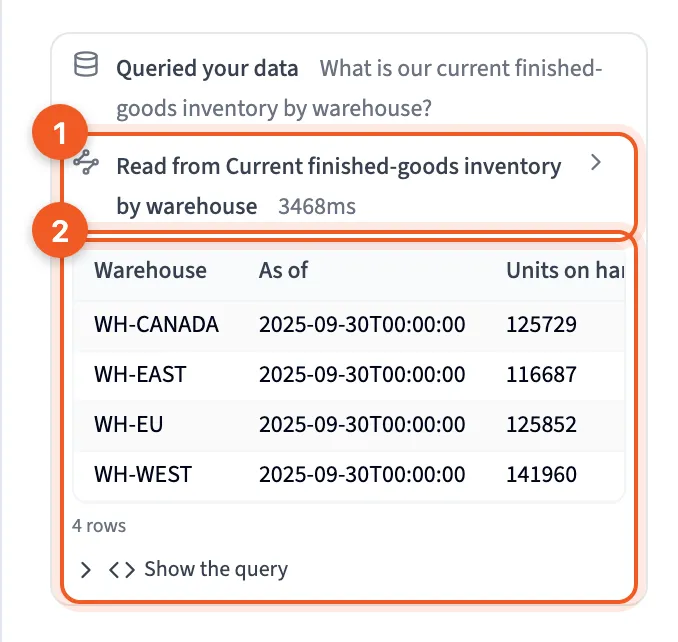
- Read from Current finished-goods inventory by warehouse: the route row. Click it to see everything the answer read or touched.
- The result: the rows the query returned, the count (4 rows), and Show the query, which opens the SQL.
Next steps
Section titled “Next steps”- The Librarian
- How the Library learns: how views and KPIs get added, so more questions take the first path.
- Views
- Check an answer before you share it