
Facts & Rules
Esta página aún no está disponible en español. Se muestra la versión en inglés.
Every business runs on rules that live in someone’s head. What counts as a sale. Which shipments count toward on-time delivery. Which column is mostly blank and shouldn’t be trusted. A tool that doesn’t know those rules gives answers that are technically right and practically wrong. Facts are where the rules get written down.
Leer la transcripción
Why your numbers need definitions
Facts and Rules are where you teach Querri what your business means… the definitions behind your numbers. Ask for sales, and someone has to decide… orders placed, or orders paid? Every business has rules like that, and most of them live in someone’s head.
Write a rule down
A fact is a rule or definition you’ve written down, like “sales means paid orders only”. You don’t fill in a form. Tell the Librarian the rule in chat, and it records it for you.
Find your facts
Accept a Worth remembering card in your Inbox, and that becomes a fact too. Every one of them lives under Facts and Rules, in your Library.
How Querri uses them
When you ask a question or build a view, Querri pulls in the facts and rules that are relevant to it… so it starts from your definitions. Start by telling the Librarian what counts as a sale.
The idea
Section titled “The idea”The Facts & Rules tab describes them as ‘Business rules and definitions you have recorded, for example “sales means paid orders only”.’ A fact can also be something noticed about the data, like a column with a lot of gaps.
Each fact has a statement, a kind (note, data quality, timing or scope), a confidence shown as a percentage, and the things it’s About, such as a table or a view.
The Librarian records facts as you chat. When a rule or a data-quality finding gets settled, it writes the fact down. There’s no approval step, so it’s worth reading what it recorded. Accepting a card in your Inbox records one too: a Worth remembering card is a fact, and accepting any card also records a fact with the reasoning behind it.
You can also write one yourself with Attach a fact on a column’s detail panel. That’s the only place to add a fact by hand. A fact you attach starts out as a note, and you can change its kind afterwards. Onboarding doesn’t create facts.
Facts are read by Querri as well as by people. When Querri writes a query against a table, it takes into account the facts attached to that table, and it does the same when it builds a view from it. A rule recorded once gets considered every time that data is queried, whoever is asking.
Two limits are worth knowing. A fact applies to what it’s attached to, not to everything in the Library. And an answer doesn’t show which facts went into it. Querri takes your facts into account, but when a number matters, check the answer.
An example
Section titled “An example”Curio’s on-time delivery rate is a good one to follow. The view On-time delivery rate by carrier works out “the share of delivered shipments that arrived within the promised transit days”. A scope fact attached to that view adds that it counts only delivered shipments matched to an SLA target. And a data-quality fact on the shipments table records how many shipments have no delivery date, and how many don’t match an SLA at all.
Read together, they tell you what the number means. So what happens to a shipment that never got a delivery date? It isn’t counted as late. It isn’t counted at all. Without those facts, “our on-time rate” sounds like it covers every shipment.
Now take a rule Curio doesn’t have. Say your finance lead decides that revenue means paid invoices, the money in the bank, and not invoices sent. Nothing in the Curio sample defines revenue either way. In your own Library, that’s a fact worth recording on the table your invoices come from. Ask the Librarian to record it, or attach it yourself to the column that holds the invoice status.
Where it lives in Querri
Section titled “Where it lives in Querri”Every fact is listed on the Facts & Rules tab in the Library. A collection page shows its facts in full under Facts & rules, and the panel for a table, a view or a column lists them under Facts attached.
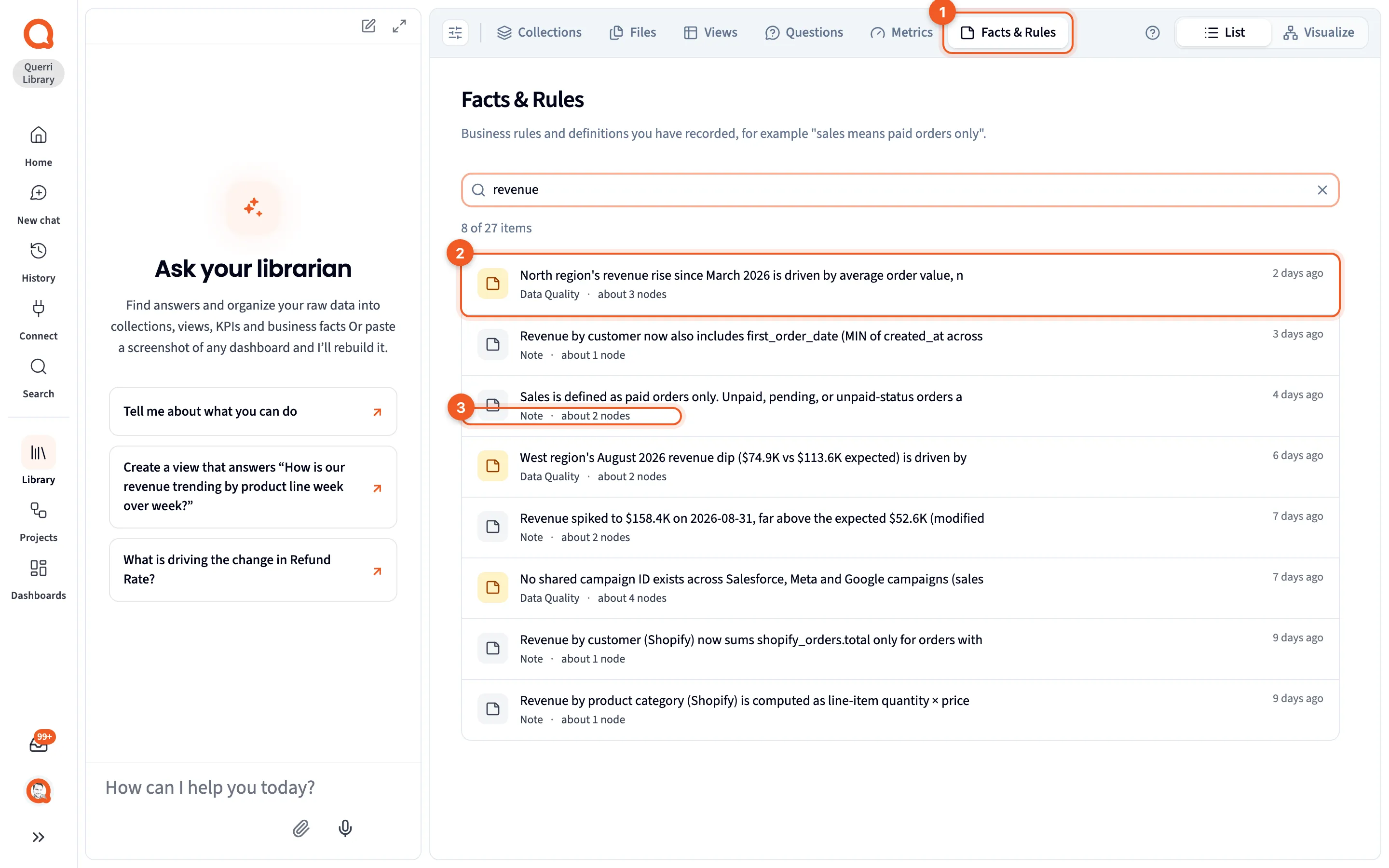
Each row on the tab shows the start of the fact, cut off after 80 characters, then its kind and how many items it’s about. Open a fact to read the whole statement, its confidence, and the chips under About that name exactly what it’s attached to. Detail panels covers the fact panel, and Attach a fact covers writing one.
On the Visualize map, facts are grey. Inside a collection, a fact is a note row next to what it’s about. Elsewhere it’s a small grey circle beside the one item it describes, and a fact about several things is a grey circle of its own.
Next steps
Section titled “Next steps”- Write down definitions and rules puts this into practice.
- How Querri answers a question shows where facts come in.
- Views covers the tables facts are often attached to.