
Choose the KPIs to track
Esta página aún no está disponible en español. Se muestra la versión en inglés.
End up with a short list of KPIs, each tied to a question your business asks, each measured one way, and together covering more than revenue.
Before you start
Section titled “Before you start”- Permissions: anyone who’s signed in can ask the Librarian for a KPI or accept a Metric to track card. There’s no button to create one by hand.
- Data you need: your anchor questions, and connected data to measure KPIs from. Without data, a KPI stays ASPIRATIONAL and has no value.
- Credits this uses: each message to the Librarian uses a credit. Switching a dimension or changing a KPI’s state on its panel costs nothing.
1. See what you already have
Section titled “1. See what you already have”Open Library, then the Metrics tab. If you went through onboarding, up to three KPIs are already here, marked ASPIRATIONAL until they’re measured from your data.
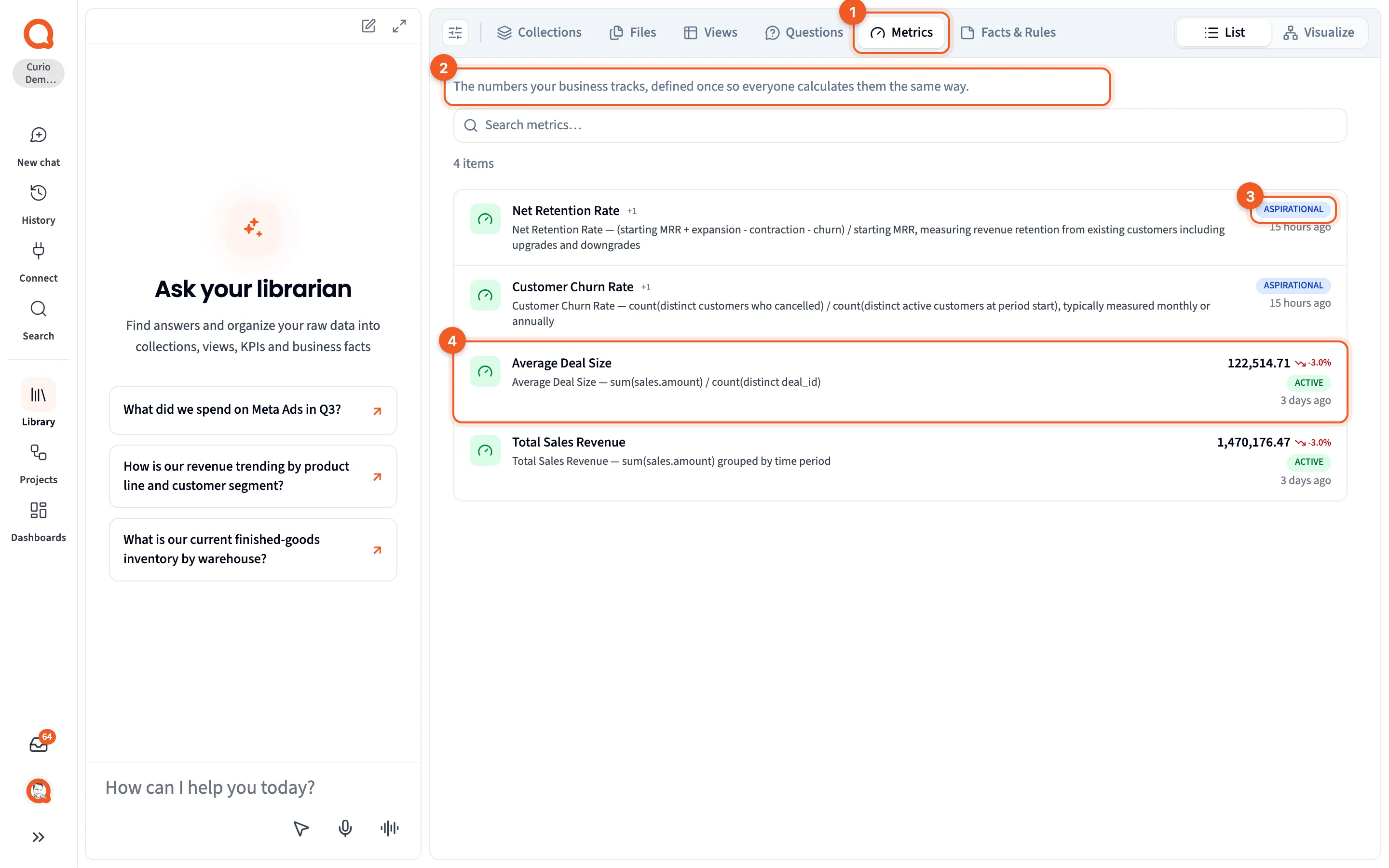
- Metrics: the tab.
- The description: “The numbers your business tracks, defined once so everyone calculates them the same way.”
- ASPIRATIONAL: a KPI nothing measures yet.
- A KPI with a value: its latest value, the change, and ACTIVE.
Each row’s icon is colored by the KPI’s first dimension: green for Revenue, orange for Cost, blue for Efficiency, purple for Quality and red for Risk. “+1” means it counts toward one more.
2. Start from your anchor questions
Section titled “2. Start from your anchor questions”The KPIs worth tracking follow the questions you keep asking. For each anchor question on the Questions tab, ask: what one number would tell us whether this is going well?
For Curio, you might pair them like this:
| Anchor question | A KPI that tracks it |
|---|---|
| What is our revenue by channel (eCommerce, retail, B2B)? | Total Revenue, Channel Concentration |
| What is our current finished-goods inventory by warehouse? | Stockout Rate, Inventory Turns |
| What is our on-time delivery rate by carrier? | On-Time Delivery Rate |
Once a KPI exists, its panel lists the questions it measures under Questions, and a question’s panel lists its KPIs under Bound KPIs.
3. Cover the five dimensions
Section titled “3. Cover the five dimensions”Every KPI counts toward at least one of five dimensions of business value: Revenue, Cost, Efficiency, Quality and Risk. Sort your list by dimension and look for the empty ones. If everything lights up Revenue, you’re watching money come in and nothing else.
Curio’s KPIs cover all five:
| Dimension | Curio’s KPIs |
|---|---|
| Revenue | Total Revenue, Average Order Value, Repeat Purchase Rate |
| Cost | COGS, CAC by Channel, Manufacturing Cost per Unit |
| Efficiency | Return on Ad Spend, Inventory Turns, Order-to-Ship Time |
| Quality | Refund Rate, On-Time Delivery Rate, Stockout Rate |
| Risk | Channel Concentration, Single-Warehouse Dependency |
Risk is the easy one to leave empty. What happens if one channel or one warehouse has a bad month?
The Librarian picks one to three dimensions when it adds a KPI. To change them, click a dimension on the KPI’s panel. It saves straight away, and a KPI has to keep at least one.
4. Give each KPI one measurement
Section titled “4. Give each KPI one measurement”Write the definition as one sentence before you ask for it: what’s counted, over what period, any filter, and the table it comes from. Then ask the Librarian:
Track gross margin as a KPI: revenue minus COGS, divided by revenue, by month.
Open the new KPI and compare its Measurement (the Window, Aggregation and Filter) and Measured from with your sentence. If anything is off, ask the Librarian to change it. The panel doesn’t edit the calculation.
If two teams want the number counted two ways, settle it now rather than keeping both. One number, one definition walks through that.
5. Accept Metric to track cards on purpose
Section titled “5. Accept Metric to track cards on purpose”Your Inbox offers Metric to track cards. Accepting one adds the KPI with its first value, and it can add a question, a view and a fact too.
Before you accept, check three things. Does it track a question you ask? Which dimension does it fill? And does the query in Evidence count what your business means? The Librarian picked that definition. If it’s close but not right, use Accept with edits. If you don’t need it, choose Not useful and say why. See Work through your Inbox.
6. Keep the list short
Section titled “6. Keep the list short”A handful of KPIs people trust is worth more than dozens nobody reads. When you stop tracking one, set its state on the panel to DEPRECATED, and its name is struck through on the Metrics tab. Leave a KPI you want but can’t measure yet as ASPIRATIONAL.
7. Pick the few worth a monitor
Section titled “7. Pick the few worth a monitor”A monitor watches a KPI’s number broken down by region, store or channel, and tells you which part moved. Save monitors for the KPIs where one part slipping costs you before anyone notices, like Curio’s Stockout Rate by warehouse. Monitor this on the KPI’s panel sets one up. See Monitors.
The Inbox can suggest one, too. A Worth watching card means a KPI moved in a way its own history says is unusual, and accepting it sets up a monitor on that KPI. To break it down first, by warehouse for example, use Accept with edits.
Check your work
Section titled “Check your work”- Every KPI on Metrics lists a question you ask under Questions.
- Each of the five dimensions has at least one KPI.
- Each KPI’s Measurement and Measured from match the sentence you wrote.
- KPIs you’ve stopped tracking read DEPRECATED.
Troubleshooting
Section titled “Troubleshooting”You can’t find a button to add a KPI. There isn’t one. Ask the Librarian, or accept a Metric to track card.
A KPI shows no value. It’s ASPIRATIONAL, or its panel says Not yet computable, because nothing measures it yet. Connect the data, then ask the Librarian to measure it from the table that holds it.
A KPI counts toward the wrong dimension. Click the right dimension on its panel, then click the wrong one to switch it off.
Two KPIs measure the same thing. Keep the one that matches your definition and set the other to DEPRECATED.
The value is hidden. Your access covers only some rows of the table it’s measured from, and the value is calculated across all of them.
Next steps
Section titled “Next steps”- KPIs and the five dimensions of business value: what a KPI is made of.
- KPI panel: everything a KPI’s panel shows.
- One number, one definition: settle a number people disagree on.
- Work through your Inbox: a routine for cards, Metric to track included.