
Credits
Esta página aún no está disponible en español. Se muestra la versión en inglés.
What does a question cost? Most everyday work uses a credit, a few kinds use part of one, and every charge is listed where you can see it.
The idea
Section titled “The idea”A credit is the unit Querri counts work in. Your organization has a monthly allowance that everyone shares, and each piece of work draws from it.
These are the default rates. Your plan may differ, and your organization’s own rates are always under How credits are counted.
| What uses credits | Default rate |
|---|---|
| Question asked in the Library | 1 credit per question |
| Question answered in a project | 1 credit per question |
| Table built in the Library | 1 credit per table |
| Connector sync | 1 credit per sync |
| Nightly insight analysis | 1 credit per analysis |
| Step refinement | 0.5 credits per refinement |
| Scheduled project run | 1 credit per 10 steps |
| Researcher rows | 0.001 credits per row |
A question to the Librarian is charged once per turn, however many queries it runs to answer you, and a question to the dashboard assistant counts the same way. Discuss and Accept with edits in the Inbox start a Librarian chat, so they use a credit too.
Connector syncs cost a credit only when a schedule runs them and something actually synced. Syncs you start yourself, and file uploads, don’t.
Parts of a credit add up through the month, so two step refinements make one credit. A scheduled project run is counted in blocks of 10 steps, rounded up, with at least one block, so a 25-step run is 3 credits. Nightly insights spend the organization’s credits too, but never more than the Nightly credit budget an admin sets: “One credit is one analysis.”
When something fails, it depends how far it got. A failed table build costs nothing. A Library question is charged once the model has been called, even if it errors afterwards, and a project question is charged once even if it errors partway through.
When a rate changes, only later charges use the new rate.
Limits and alerts
Section titled “Limits and alerts”The organization’s monthly allowance is soft. When it’s used up, work carries on, the extra use is billed, and a Monthly credits used up prompt appears.
A person’s limit is hard. Admins can set a Default limit per person and a Monthly credit limit for anyone, from Unlimited down to 5 credits a month. When someone reaches their limit, nothing more runs for them until their credits reset, and the message tells them an admin can raise it. As the setting itself says, “Credits are still shared across your organization; a limit only caps how many one person can use each month.” A scheduled sync counts against whoever created the schedule, and nightly insights aren’t stopped by anyone’s limit.
Usage alerts need no setup. Approaching limit fires at 80% of a plan limit, Over limit once it’s passed, and Usage spike when credit use jumps well above the usual rate. They watch the organization’s limits, not each person’s, and admins choose who else gets them by email.
An example
Section titled “An example”Say you spend a morning getting ready for a quarterly review, at the default rates:
| What you did | Credits |
|---|---|
| Asked the Librarian three questions about Curio’s revenue by channel | 3 |
| Opened a project and asked two questions there | 2 |
| Refined one step twice | 1 |
| Your project’s scheduled refresh ran 25 steps overnight | 3 |
| A connector you scheduled to sync daily ran once | 1 |
| Total | 10 |
Nightly insights can add up to their budget on top, which is 3 credits a night unless an admin changed it. That budget belongs to one workspace, so an organization running the pass in more than one adds a budget for each. Each charge shows up as its own line under What used credits, with who used it and the rate applied.
Where it lives in Querri
Section titled “Where it lives in Querri”Open Settings and choose Monitor Usage (the page itself is titled Usage Settings). Everyone in the organization can open it.
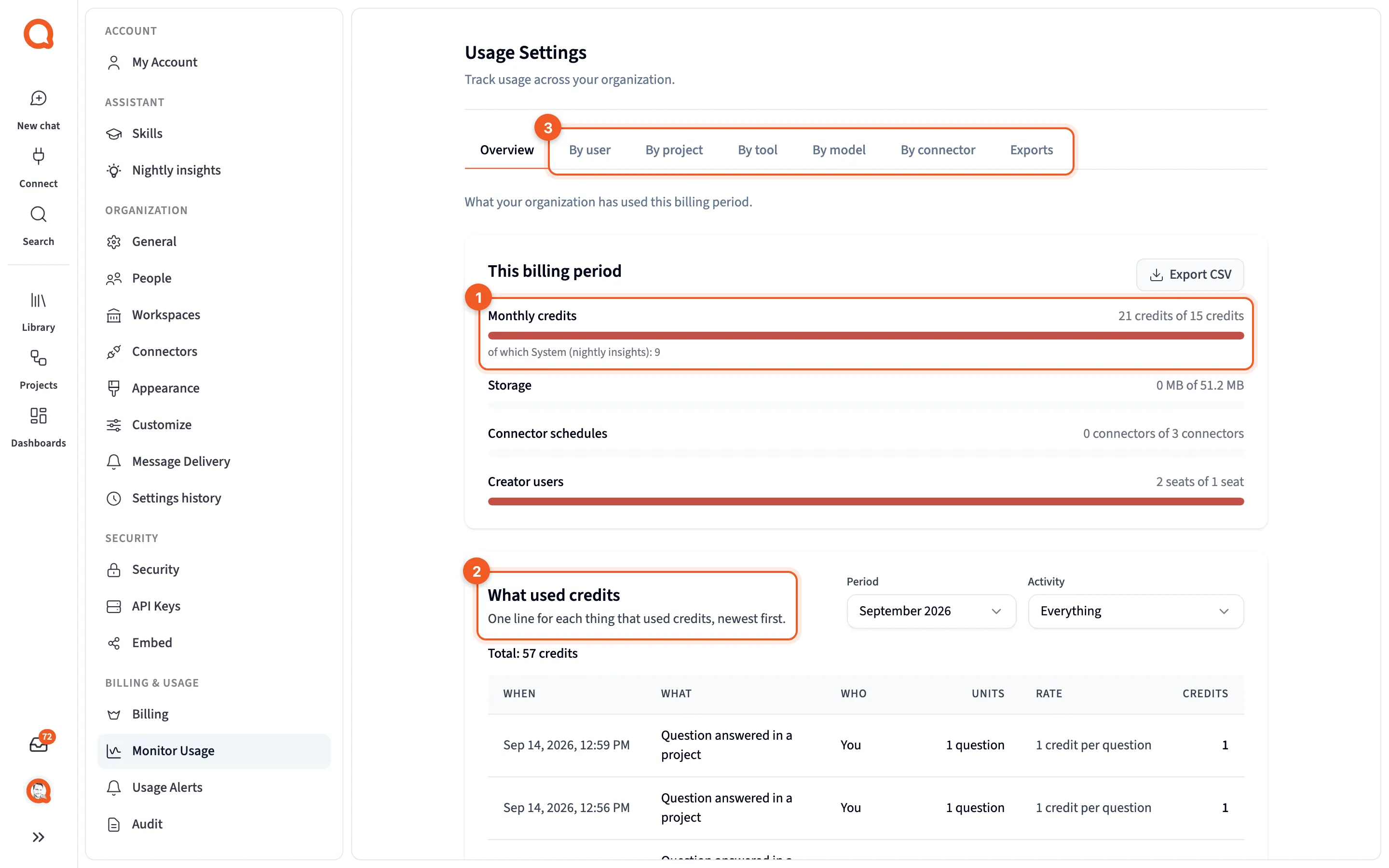
This billing period shows the Monthly credits gauge, which turns amber at 80% and red past 100%. What used credits lists one line per charge, newest first, and you can filter it by Period and Activity. Its Who column reads You, a person’s name, A teammate, Nightly insights, Scheduled run or Automatic. Members see names only on their own rows. How credits are counted lists your organization’s rates.
The tabs break usage down further. By user (admins only, by default), By project and By tool split credits, while By model shows tokens and By connector shows sync runs. Monitor usage covers the page in detail.
Admins set personal limits under People, choose alert recipients on Usage Alerts, and set the Nightly credit budget on Nightly insights.
Next steps
Section titled “Next steps”- Keep credit use predictable puts this into practice.
- How the Library learns explains the nightly work the budget pays for.