
Check an answer before you share it
Esta página aún no está disponible en español. Se muestra la versión en inglés.
Before a number from Querri goes into a deck or an email, spend a minute checking where it came from, so you can stand behind it.
Before you start
Section titled “Before you start”- Permissions: anyone who can see an answer can check it.
- Data you need: an answer from Librarian chat. The example uses Curio; see Explore the sample company.
- Credits this uses: checking costs nothing. A follow-up question is a message to the Librarian, and each one uses a credit.
Say you’re deciding what Curio should reorder, and you’ve asked, “What is our current finished-goods inventory by warehouse?“
1. See what the answer read from
Section titled “1. See what the answer read from”The first line of the answer block, the route row, says where the answer came from.
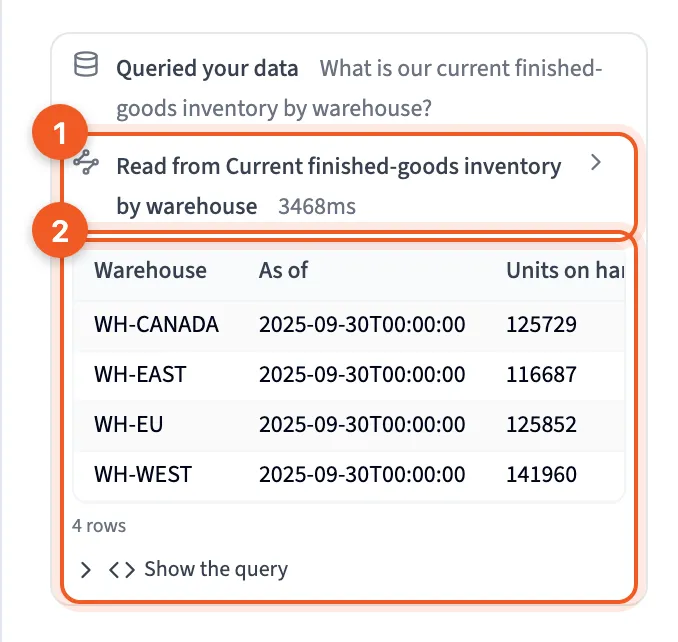
- The route row: where the answer came from. Click it to see everything the answer read or touched.
- The rows: what the query returned, with the count and Show the query underneath.
It starts one of three ways:
- Read from a view or KPI: something your team already built answered it.
- Queried a table, or several tables: it was answered straight from your source data.
- Searched your library: it found things to look at but read none of them, so there’s no number to check.
Curio’s answer reads Read from Current finished-goods inventory by warehouse. Is that the table you’d have used?
Click the route row for the full list. Anything the answer only touched carries a note:
| Note | What it means |
|---|---|
| joined | A table joined in, for example to turn IDs into names |
| also matched | A close runner-up that wasn’t used |
| tried, no data | A view it tried that came back empty, so it answered from source tables instead |
| matched, not extracted | A spreadsheet that matched but has no table in it yet |
- The route header: what the answer read from.
- also matched: a runner-up the answer didn’t use.
2. Look at the rows
Section titled “2. Look at the rows”Check that the rows cover what you expected. Curio has four warehouses, so you should see four rows: WH-CANADA, WH-EAST, WH-EU and WH-WEST. A missing store, month or region is the easiest mistake to spot.
Only the first 8 rows show at first. A longer result says something like Showing 8 of 340 rows, with Show all beside it. Cells hold raw values, so a date reads 2025-09-30T00:00:00 even when the reply below formats it.
3. Open the query
Section titled “3. Open the query”Click Show the query to see the SQL behind the rows, and Copy it if someone else wants a look.
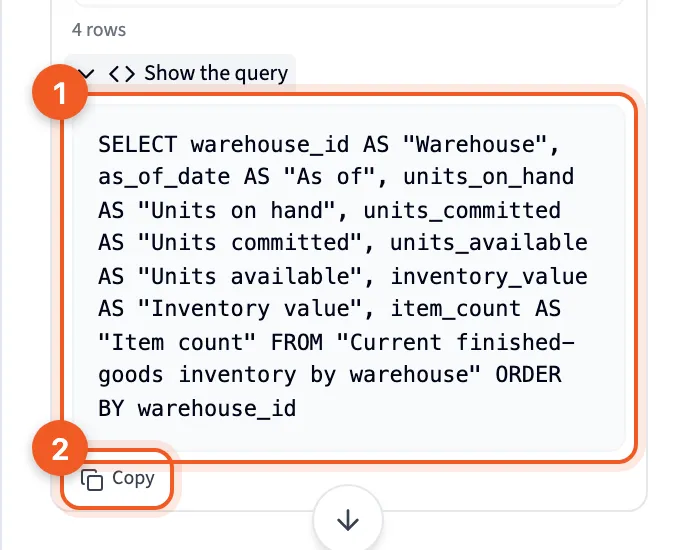
- The query: the SQL that produced the rows.
- Copy: copy it.
You don’t need to read SQL well. Look for:
- the table names after
FROM, which should match the route row - the conditions after
WHERE, which are the filters and dates it used - what it groups by, which is how the rows are split
Curio’s query reads straight from the view.
4. Compare with the KPI
Section titled “4. Compare with the KPI”If your team tracks this number as a KPI, open it: Library, then the Metrics tab, then the KPI. When you ask about a KPI’s number, the Librarian quotes the value the KPI has already calculated, so the two should match.
Check two things on the KPI panel:
- Measured from names the same table as your answer’s route row.
- Measurement shows the Window, Aggregation and Filter the KPI uses, which should match what you meant.
If the value is hidden, or the panel says Not yet computable, there’s nothing to compare yet.
5. Check the basics
Section titled “5. Check the basics”Do the query’s dates match the period you meant? Curio’s data stops at September 2025, so “this year” can’t reach past it. Is anything left out that belongs in, or counted that shouldn’t be, like refunds? And does a total line up with a number you already trust, like last month’s report?
6. Ask a follow-up when something’s off
Section titled “6. Ask a follow-up when something’s off”Ask in the same chat, in plain words:
- “Which dates does this cover?”
- “Does this include refunds?”
- “Use the shipments table instead.”
If the problem is a definition, like what counts as revenue, fix it once so everyone gets the same number next time. One number, one definition shows how.
Check your work
Section titled “Check your work”- It read from the table you’d have used.
- The rows cover everything you expected.
- The dates and filters match your question.
- A KPI’s value and Measured from agree with it.
- The totals match a number you trust.
Troubleshooting
Section titled “Troubleshooting”The answer reads Query declined. Nothing in your Library could answer it, and the route row says Searched your library. There’s no number to check. See When nothing fits.
A table was built for you. It comes marked as unsaved, with a card offering Save this table as a view. Check it the same way before you save it. Saving is your call, and it uses a credit once the view is built.
There’s no query to open. Show the query reads “The query was not recorded for this result.” There’s no SQL to check for that answer.
An older chat shows no rows or query. Answers from before late August 2026 reopen without their tables, route row or query. Ask the question again.
An “also matched” item has nothing to do with your question. That’s fine: the search found it, but the answer didn’t use it. Curio’s inventory answer lists marketplace revenue and delivery rate views as runners-up.
Next steps
Section titled “Next steps”- How Querri answers a question: why an answer reads from a view or from your source data.
- Checking where a chart came from: the same check for a chart in a project.
- KPI panel: everything a KPI shows about how it’s measured.