
Importing and exporting skills
Esta página aún no está disponible en español. Se muestra la versión en inglés.
A .qskill file carries a skill outside Querri. Export one to keep a copy or hand it to another organization, and import one to add it to your own skills.
Who can see this: everyone in the organization. You can export any skill you can see, and anyone can import. An import always arrives as your own private skill.
Export a skill
Section titled “Export a skill”On the Skills page, find the skill’s card and click Export as .qskill. Your browser downloads the file.
This works on every skill you can see, including skills shared with the organization that someone else made. You don’t need to be able to edit a skill to export it.
Import a skill
Section titled “Import a skill”- On the Skills page, click Import.
- In Import a .qskill file, click “Click to select a .qskill file” and choose the file.
- Check the preview. It shows the skill’s Title, Description and Required tools. If it’s the wrong file, click Pick another file.
- Click Import as new skill.
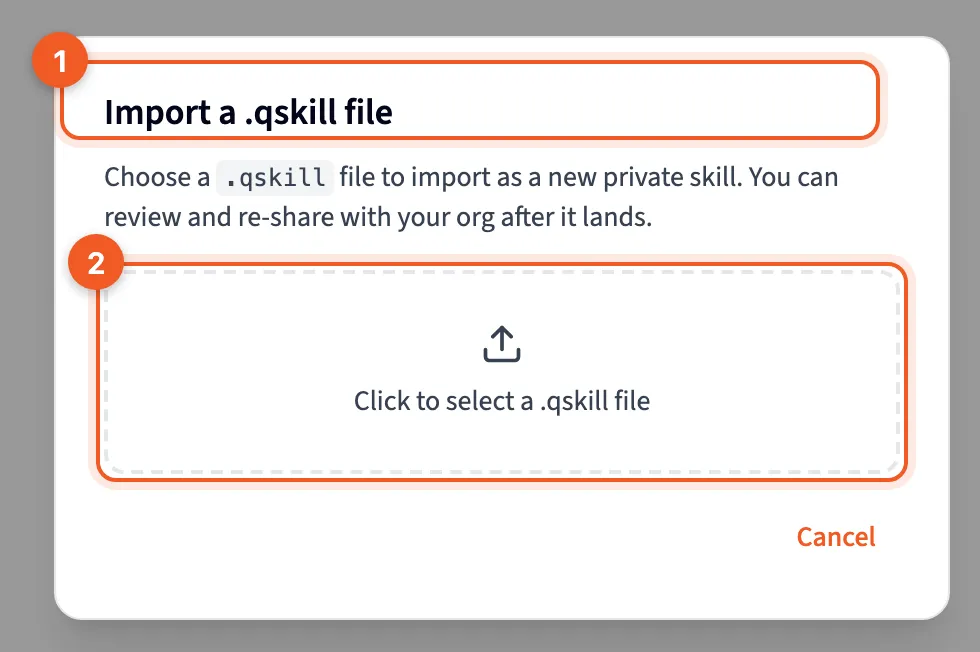
- Import a .qskill file: “Choose a .qskill file to import as a new private skill. You can review and re-share with your org after it lands.”
- Click to select a .qskill file: pick the file from your computer.
If the file isn’t a skill Querri can read, the dialog tells you what’s wrong instead of showing a preview.
The skill lands in My Skills as a new, private skill, whether or not it was shared where it came from. Only an admin can share it with your organization. See Share a skill.
Before you load an imported skill
Section titled “Before you load an imported skill”A skill from another organization was written for someone else’s data. Its example plan may name tables and columns you don’t have, and its instructions may use terms your team doesn’t. Open it with Edit and read it through before you load it into a chat.
Ways to use this
Section titled “Ways to use this”- To move a skill to another organization, export it, send the file, and have someone there import it.
- Before you rework a skill, export it. If the new version turns out worse, import the old file. It comes back as a separate skill, so copy what you need into the original, or switch to the imported one.
- Skills you reuse often can live as
.qskillfiles somewhere your team can reach, ready to import into a new organization.
Importing always adds a new skill. It never updates a skill you already have.